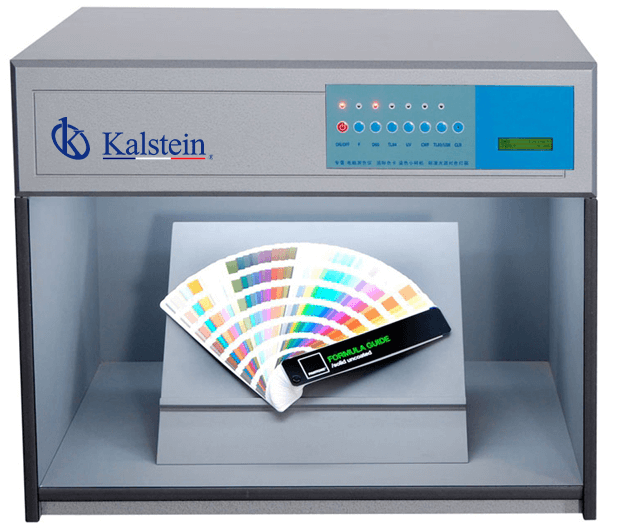
Troubleshooting Common Issues with the YR05530 Color Evaluation Box
The YR05530 Color Evaluation Box is a crucial tool for accurate color assessment across various industries. However, like any sophisticated equipment, it can encounter issues that may hinder its performance. This article will explore common symptoms experienced with the YR05530, delve into probable causes, and provide concrete solutions to each problem, ensuring that users can maintain optimal functionality of the device.
Technical Specifications of the YR05530
| Model | YR05530 |
| Project | Configurations |
| Configuration | F, D65, TL84, UV, CWF/TL83, A with a total of six light sources |
| Weight | 28 Kg |
| Size (L x W x H) | 710 x 530 x 570 mm |
| Optional Accessory | Light source diffuser, 45-degree standard support |
Common Symptoms and Troubleshooting Steps
Understanding the various symptoms that may arise during the operation of the YR05530 is vital for effective troubleshooting. Below are common issues, their probable causes, and recommended solutions.
Equipment Does Not Power On
This is a common issue that can prevent the use of the YR05530 Color Evaluation Box. Here are potential causes and solutions:
- Power Source Issues: Ensure that the power supply is plugged in and the outlet is functioning. Test with a different device.
- Circuit Breaker: Check the circuit breaker to ensure it has not tripped. Reset if necessary.
- Internal Faults: If none of the above are the issue, internal components may need inspection or replacement.
Error Codes Displayed
Encountering error codes can be alarming but often indicates specific issues that can be resolved:
- Error Code E-01: This may indicate a problem with the light source. Inspect bulbs for functionality and replace them if necessary.
- Error Code E-02: This typically points to communication errors within the device. Restart the unit and check connections.
- Error Code E-03: Indicates a system malfunction. Consult the user manual for specific troubleshooting steps.
Inconsistent Readings
Variability in measurement can undermine the reliability of color assessments:
- Calibration Issues: Regularly calibrate the device according to the manufacturer's guidelines. Ensure that calibration references are valid.
- Environmental Factors: Ensure that the surrounding lighting conditions do not interfere with readings. Conduct tests in a controlled environment.
- Sample Preparation: Ensure samples are prepared consistently to mitigate variations that could affect readings.
Symptom-Cause-Solution Matrix
| Symptom | Probable Cause | Solution |
|---|---|---|
| Equipment does not power on | Power source issues, circuit breaker tripped | Check power connections, reset breaker |
| Error code displayed | Internal fault, communication errors | Refer to user manual, restart device |
| Inconsistent readings | Calibration issues, environmental factors | Regular calibration, control environment |
Maintenance Recommendations for the YR05530
To minimize operational issues with the YR05530, regular maintenance is essential. Here are some recommendations:
- Regular Calibration: Establish a routine for calibration based on usage frequency to ensure accuracy.
- Cleaning: Regularly clean the internal components and external surfaces to prevent dust buildup that could interfere with functionality.
- Component Checks: Regularly inspect light sources for wear and replace bulbs as necessary to maintain consistent lighting.
Common Maintenance Tasks
Set a maintenance calendar to keep track of essential tasks, including:
- Monthly calibration checks
- Quarterly component inspections
- Annual thorough cleaning and servicing
Frequently Asked Questions
What light sources does the YR05530 model include?
The YR05530 model comes with six standard light sources, covering a wide range of evaluation needs across different environments and conditions.
Is the YR05530 durable?
Yes, the YR05530 is designed for durability and includes a time counter for each light source, facilitating maintenance and bulb replacement as needed.
Can the YR05530 be used in industrial environments?
Absolutely. Its user-friendly design, without preheating and with touchscreen controls, makes it suitable for high-demand industrial settings.
What should I do if the YR05530 displays an error code?
If an error code appears, refer to the user manual to identify the specific issue and follow troubleshooting guidelines to rectify it.
How can I ensure accurate color assessments with the YR05530?
To ensure accuracy, maintain a consistent environment for testing, regularly calibrate the device, and prepare samples uniformly before evaluation.
How does the YR05530 compare with other color evaluation boxes?
The YR05530 is equipped with multiple light sources and advanced features such as automatic switching and touch controls, making it a top choice for precision in color evaluation.
If you require precision in color management, the YR05530 is the ideal choice. Do not hesitate to request a quote through Kalstein Plus for more details and to secure the best benefits.
If you are looking for a fusion of innovation and quality, you have come to the right place. At Kalstein, we offer you the luxury of exploring our exclusive catalog of laboratory equipment. We manufacture every device to the highest standards of excellence. Our intuitive and seamless online purchasing channels are designed for your convenience, securing the most competitive prices. Hesitate no longer — we bring science to life, it is time to become part of our community.